The inquiry arrives without context.
A form notification says someone is interested, but not which campaign, service page, location, or conversation created the interest. Your team starts every follow-up by reconstructing the past.
CRM / SALES + WORKFLOW AUTOMATIONDRIFTLSS 02
Connect every inquiry, conversation, follow-up, and report in one workspace built around how your business works. ABA and pediatric care are specialties; we also build CRM systems for ambitious businesses across industries.
DRIFTLSS_CRM / SALES
32 active +14%
THE HANDOFF TAX
A CRM earns its place when it shortens response time, preserves context, clarifies ownership, and exposes the exact point where an opportunity stops moving.
A form notification says someone is interested, but not which campaign, service page, location, or conversation created the interest. Your team starts every follow-up by reconstructing the past.
The opportunity technically exists, but nobody can see who is responsible, when the next touch should happen, or whether the customer is waiting on a quote, a meeting, or an answer.
When a busy day interrupts the sequence, a qualified prospect quietly ages in the inbox. A spreadsheet cannot create a task, enforce a response target, or escalate a stalled opportunity.
Marketing counts form fills while sales counts closed work, but no shared record connects the two. Owners cannot see which source creates revenue or where the customer journey loses momentum.
INSIDE THE OPERATING SYSTEM01 / 04
We define the pipeline in operational language: new inquiry, qualified, proposal sent, decision pending, won, or closed with a specific reason. Each transition has an owner, a timestamp, and a required next action.
Forms, calls, chat transcripts, referral details, campaign source, company and project details, tasks, and meetings arrive together. Fields exist only when they affect routing, qualification, communication, reporting, or a decision.
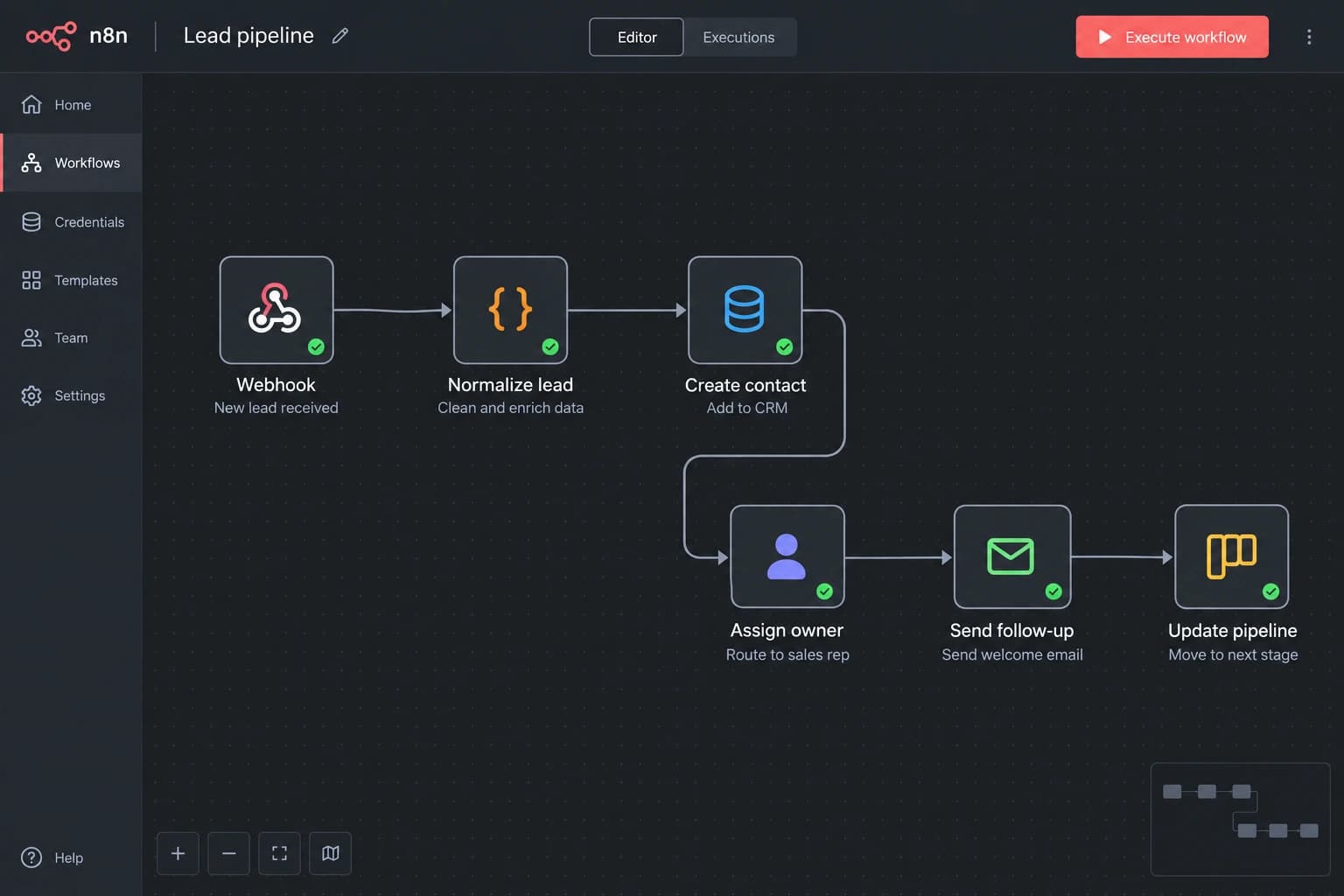
The system assigns owners, creates tasks, sends approved confirmations, alerts on stale leads, and escalates missed response targets. Humans still handle nuanced conversations; the CRM makes sure those conversations happen on time with context.
We connect source, response time, win rate, sales cycle, loss reason, stage aging, service line, location, and capacity. Reporting becomes a weekly operating tool: where to follow up, where to add capacity, and which source deserves more investment.
Call completedToday, 9:42 AM
Project brief attachedYesterday, 8:14 PM
Quote requestedYesterday, 8:02 PM
Google Ads / remodel campaignFirst source
Trigger: qualified remodel inquiry
THE OPERATIONS BLUEPRINT
Before we style a card or chart, we define the objects, relationships, owners, states, permissions, sources, and events that make the system trustworthy. Good interface design makes a good operating model easy to use; it cannot rescue a confused one.
CRM / lead-pipeline.json
ONE DATABASE / DIFFERENT DECISIONS
Every role sees the same underlying truth through a view designed for the decisions they own. Less noise makes accountability easier.
A focused queue of new inquiries, due follow-ups, quotes, meetings, and exceptions—ordered by urgency instead of arrival time.
ROLE VIEWStage aging, unowned records, missed response targets, team workload, close reasons, and the handoffs most likely to create a future miss.
ROLE VIEWDemand by source, service, and location; conversion through each stage; capacity alignment; and the acquisition channels creating real revenue.
ROLE VIEWTHE COST OF AN INVISIBLE QUEUE
This directional model estimates the value of recovering only 30% of inquiries currently lost to slow response, unclear ownership, or inconsistent follow-up. Replace the assumptions with your real numbers.
Planning model only—not a promise of results.each month
directional monthly value
HOW WE BUILD IT / OPERATIONS TOUR
Move through the operating model and watch each decision become a field, stage, permission, automation, or report before it becomes expensive to change.
We follow inquiries from form, phone, chat, referral, and campaign through qualification, quoting, meetings, follow-up, and outcome. Every manual copy, invisible queue, and ownership gap gets documented.
Workflow audit + leak mapTogether we name stages, owners, permissions, required fields, response targets, loss reasons, and the decisions each role needs to make without hunting through the system.
Pipeline + data specificationSales sees today’s follow-ups, managers see exceptions and pipeline aging, and owners see demand, capacity, and revenue. The interface changes with the responsibility—not the other way around.
Workspace prototypeForms, calendars, phone systems, assistants, messaging, ad platforms, and approved operational tools feed the same record with source and conversation context attached.
Integration map + live recordsWe add routing, tasks, alerts, confirmations, follow-up sequences, escalation rules, and audit history around the team’s judgment rather than attempting to replace it.
Tested workflow automationsWe migrate what matters, train by role, watch the live process, and adjust fields, queues, dashboards, and triggers once real work reveals what the prototype could not.
Live CRM + optimization backlogTHE OPERATIONS READING LIST
Follow a website inquiry from form submission to human response, with clear ownership, a backup for failed delivery, and useful ways to measure the handoff.
Most therapy practices quietly lose six figures a year to unanswered phones. Here's the missed-call math, why voicemail makes it worse, and the AI fix that closes the gap.
How to answer parent questions 24/7 without hiring more staff. A complete step-by-step guide to deploying AI-powered intake at your therapy practice.
BEFORE THE BUILD
The best system is not automatically the biggest or most custom one. It is the smallest reliable operating layer that makes the work visible and easier to finish.
A general CRM can be a strong fit when its standard sales model matches the work. A custom CRM makes sense when your intake stages, roles, compliance requirements, data sources, reporting, or client lifecycle are specific enough that the team spends more time working around the software than inside it. We evaluate the fit before recommending a custom build.
Usually, yes. We map each source, confirm available APIs or webhooks, define which system owns each field, and connect the relevant conversation and attribution data to one record. When a vendor has limited integration access, we identify that constraint before the build plan is finalized.
We design data collection around minimum necessary access, role-based permissions, auditability, encryption, retention, and the contracts required by the tools in the stack. For healthcare work, exact compliance scope depends on the information being handled and the vendors involved, so it is defined explicitly during discovery rather than assumed from a generic badge.
The goal is to make the real process clearer and more reliable, not impose a software company’s default funnel. We will challenge steps that create avoidable work, but stages, views, fields, and automation are designed around the decisions your team actually needs to make.
We monitor integrations, support users, repair edge cases, and adjust workflows as staffing, services, locations, and reporting needs change. A CRM is operating infrastructure, so it needs an owner and an improvement cadence—not a one-time handoff that slowly drifts out of date.
ONE PLACE TO RUN THE WORK
Bring us the spreadsheets, inboxes, workarounds, half-configured tools, and the process only one employee truly understands. We'll turn them into an operating system your whole team can use.